Cases
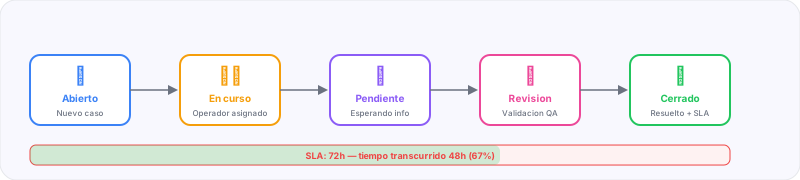
The Cases module is BiVelio’s operational core. It allows managing cases, requests and processes with defined response times (SLA), priorities, assignments and full traceability from opening to closing.
Case concept
A case in BiVelio represents any situation that requires follow-up:
- A customer request
- A support ticket
- A legal or administrative case
- A complex commercial opportunity
- An internal process requiring multiple steps
Each case groups all relevant information in a single place: communications, documents, tasks, history and compliance metrics.
Case fields
| Field | Description |
|---|---|
| Title | Brief description of the case |
| Description | Full detail of the request or problem |
| Status | Open, In progress, Pending, Resolved, Closed |
| Priority | Critical, High, Medium, Low |
| Assigned to | Responsible operator or team |
| Contact | Person linked from CRM |
| Company | Associated organization |
| Origin channel | WhatsApp, Email, Telegram, WebChat or manual |
| SLA | Maximum resolution time according to priority |
| Labels | Customizable tags for classification |
| Due date | Automatically calculated according to the applicable SLA |
SLA management
The SLA system allows defining maximum response and resolution times by priority:
| Priority | First response | Resolution |
|---|---|---|
| Critical | 1 hour | 4 hours |
| High | 4 hours | 24 hours |
| Medium | 8 hours | 72 hours |
| Low | 24 hours | 1 week |
SLA times are configurable per workspace. The values shown are the defaults. You can adjust them from Settings according to your organization’s needs.
When a case approaches its SLA limit, the system generates automatic alerts:
- Yellow alert — at 75% of time consumed
- Red alert — at 90% of time consumed
- SLA breached — when the maximum time is exceeded
AI agents can be configured to detect cases at SLA risk and take preventive actions automatically.
Available views
List view
Table with all cases, sortable and filterable by any field. Includes full-text search and combinable filters.
Kanban view
Visual board with columns by status. Allows dragging cases between columns to change their status quickly.
Detail view
When opening a case, all information is displayed in a complete view:
- Activity timeline — chronological history of all actions
- Linked conversations — ChannelHub threads associated with the case
- Attached documents — files uploaded or generated by OCR
- Internal tasks — checklist of pending actions
- Notes — internal team annotations
Automations
Cases integrate with BiVelio’s automation engine:
- Automatic creation from incoming messages in ChannelHub
- Automatic assignment by round-robin, skill or workload rules
- Automatic escalation when SLA is breached
- Notifications by email or in-app on each status change
- Workflow triggers when creating, updating or closing a case
Case metrics
The Dashboard shows specific metrics:
- Total cases by status and priority
- SLA compliance rate
- Average resolution time
- Load distribution by operator
- Case volume trend